Yaohong

为了真相不惜被羞辱

Simple Tree command

Simple Tree command

Using the follow command can view current folder tree:

find . -print| sed -e 's;[^/]*/;|____;g;s;____|; |;g'

output

$ find . -print| sed -e 's;[^/]*/;|____;g;s;____|; |;g'
.
|____composer.lock
|____LICENSE
|____README.md
|____.gitignore
|____build-phar.php
|____.git
| |____config
| |____objects
...

Below command only descend at most 2 directory levels:

find . -maxdepth 2  -e -print | sed -e 's;[^/]*/;|____;g;s;____|; |;g'

REFERENCE

Using a Mac Equivalent of Unix “tree” Command to View Folder Trees at Terminal


Categorical Crossentropy源码分析

Categorical Crossentropy源码分析

Source:

import tensorflow as tf
import numpy as np
sess = tf.InteractiveSession()

print("--------output-----------")
target = tf.constant([1., 0., 0., 0., 1., 0., 0., 0., 1.], shape=[3,3])
print("target: \n",target.eval())

output = tf.constant([.9, .05, .05, .05, .89, .06, .05, .01, .94], shape=[3,3])
print("output:\n ",output.eval())

loss = tf.keras.backend.categorical_crossentropy(target, output)
print("loss: \n",loss.eval()) # Output: [0.10536 0.11653 0.06188]

官方文档categorical_crossentropy

Output:

--------output-----------
target: 
 [[1. 0. 0.]
 [0. 1. 0.]
 [0. 0. 1.]]
output:
  [[0.9  0.05 0.05]
 [0.05 0.89 0.06]
 [0.05 0.01 0.94]]
loss: 
 [0.10536055 0.11653383 0.06187541]

问:输出中最后一行,loss第一个值0.10536055是什么得到的?


如何计算RNN和LSTM的参数数量?

如何计算RNN和LSTM的参数数量?

Environment:

python version: 3.7.4
pip version: 19.0.3
numpy version:1.19.4
matplotlib version:3.3.3
tensorflow version:1.14.0
keras version:2.1.5

代码如下:

from keras.layers import SimpleRNN
from keras.models import Model
from keras  import Input

inputs = Input((None, 5))
simple_rnn = SimpleRNN(4)

output = simple_rnn(inputs)  # The output has shape `[32, 4]`.
model = Model(inputs,output)
model.summary()

Output:

_________________________________________________________________
Layer (type)                 Output Shape              Param #   
=================================================================
input_4 (InputLayer)         (None, None, 5)           0         
_________________________________________________________________
simple_rnn_1 (SimpleRNN)     (None, 4)                 40        
=================================================================
Total params: 40
Trainable params: 40
Non-trainable params: 0
_________________________________________________________________

这里的simple_rnn_1中的param为40是怎么计算的呢?


创建一个简单的RNN网络

创建一个简单的RNN网络

Environment:

python version: 3.7.4
pip version: 19.0.3
numpy version:1.19.4
matplotlib version:3.3.3
tensorflow version:1.14.0
keras version:2.1.5

代码如下:

import keras
from keras import backend as K
from keras.layers import RNN
class MinimalRNNCell(keras.layers.Layer):

	def __init__(self, units,use_bias = True, **kwargs):
		self.units = units
		self.state_size = units
		self.use_bias = use_bias
		super(MinimalRNNCell, self).__init__(**kwargs)

	def build(self, input_shape):
		self.kernel = self.add_weight(shape=(input_shape[-1], self.units), # 添加kernel
										initializer='uniform',
										name='kernel')
		self.recurrent_kernel = self.add_weight(# 添加循环层kernel
			shape=(self.units, self.units),
			initializer='uniform',
			name='recurrent_kernel')

		if self.use_bias:
			self.bias = self.add_weight( # 添加bias
				shape=(self.units,),
				name='bias',
				initializer='uniform',)
		else:
			self.bias = None

		self.built = True

	def call(self, inputs, states):
		prev_output = states[0]
		h = K.dot(inputs, self.kernel)
		output = h + K.dot(prev_output, self.recurrent_kernel)
		return output, [output]


# Let's use this cell in a RNN layer:

cell = MinimalRNNCell(32)
x = keras.Input((None, 5))
layer = RNN(cell)
y = layer(x)

model = keras.Model(x,y)
model.summary()

Output:


Config Github with SSH

Config Github with SSH

Generating a new SSH key

1.Open TerminalTerminalGit Bash.

2.Paste the text below, substituting in your GitHub email address.

$ ssh-keygen -t ed25519 -C "your_email@example.com"

3.Then you’re prompted to do something, press Enter.

Then the keys will be saved under ~/.ssh folder.

You can use ls -al ~/.ssh command to see them.

LOG:

$ ssh-keygen -t ed25519 -C "my_email@example.com"
Generating public/private ed25519 key pair.
Enter file in which to save the key (/c/Users/myusername/.ssh/id_ed25519):
Enter passphrase (empty for no passphrase):
Enter same passphrase again:
Your identification has been saved in /c/Users/myusername/.ssh/id_ed25519.
Your public key has been saved in /c/Users/myusername/.ssh/id_ed25519.pub.

Config github key

Copy gitbash:


Quickly host your hugo web on Gitlab

Quickly host your hugo web on Gitlab

Quickly host your hugo web on gitlab.

1.Login gitlab

Gitlab

2.click new project after login

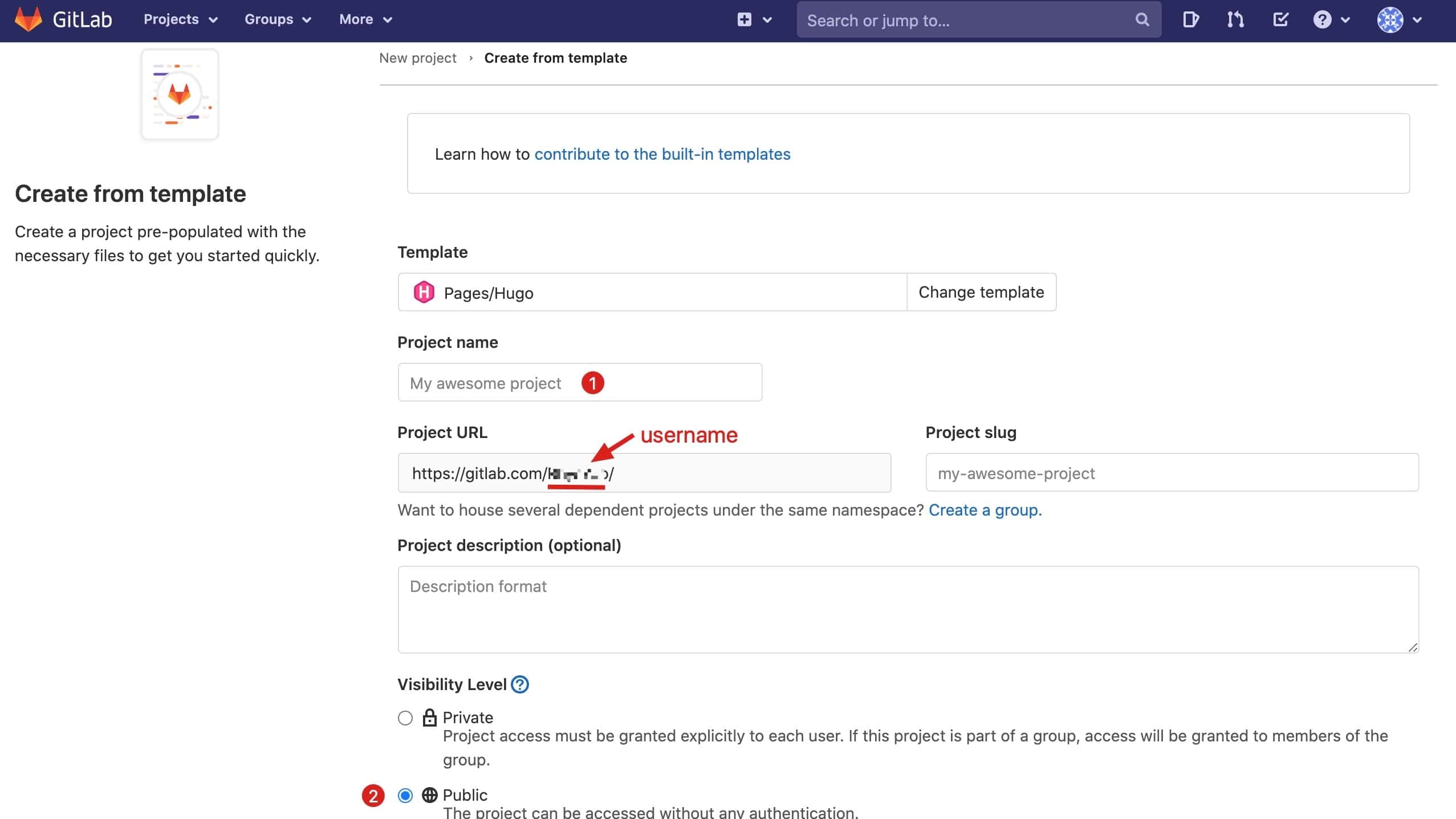
Click Create from template in Create new project and use “Hugo template”

Gitlab

In this example, my project name is: testPage

Now you can see your username on Project URL, for example, mine is https://gitlab.com/RhysYao/, and username is RhysYao which will be used later.

Create from template on Gitlab


telnet

Telnet

telnet host post

示例:

[yaohong@host ~]# telnet www.baidu.com 80
Trying 14.215.177.38...
Connected to www.baidu.com.
Escape character is '^]'.

出现Connected to表示连接上主机;

[yaohong@host ~]# telnet www.baidu.com 882
Trying 14.215.177.38...
telnet: connect to address 14.215.177.38: Connection timed out
Trying 14.215.177.39...

没有出现Connected to表示未连接成功。


如何计算一个BatchNormalization的参数?

Batch参数=前一层卷积数量x4

如何计算一个BatchNormalization的参数?

# Environment:
# OS			macOS Catalina 10.15.6
# python 		3.7
# pip 			20.1.1
# tensorflow	1.14.0
# Keras 		2.1.5

from keras.models import Sequential
from keras.layers import Conv2D,BatchNormalization
model = Sequential();
# conv2d + max pooling
model.add(
	Conv2D(96, 
		kernel_size = (11,11), 
		strides=(4, 4), 
		padding="valid", 
		input_shape=(224,224,3),
		activation="relu")
	); # output  55 * 55 * 96 

# batchNormalization ! 
model.add(BatchNormalization()) # output
model.summary();

output:


双线插值是什么?

邻近四个点,插入点距哪个点近,该点对插值的影响更大。

双线插值是什么?

图像处理中,有时我们需要放大图片,比如原来图片宽高是300*300px,如果要在500*500的屏幕上展示,这时一种方法就是把图片直接拉大到500*500,但会发现图像变得模糊了,有没有什么办法可以放大图像而又不会让图像过于模糊呢?


Understand limits to infinity

When `x->∞`, `1/x` appoachs zero, but is never equal zero!

Understanding limits to infinity

When x->∞, what is the exact number of x?

We don’t know, x is undefined.

is not a number, is a idea of having a greater number than you give.

When x->∞, 1/x appoachs zero, but is never equal zero!

When n -> ∞, does sin(1/n) / (1/n) have meaning?

I used to thought 1/n = 0 while n->∞, but 0 cannot be divided, So I was confused.